
XVX All Video Downloader
TAYAL TRADERSVideo Players & Editors
3.812.00 Reviews
- Version
- 15.0
- Installs
- 100.00K
- Age Rating
- Everyone
Screenshots

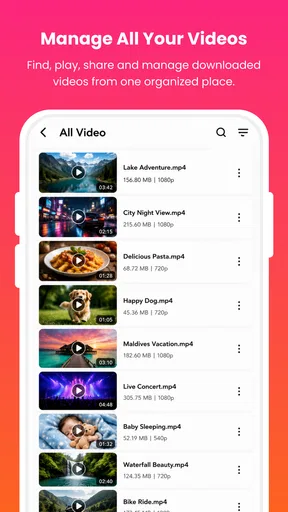
Our Review of XVX All Video Downloader
 Analysis by Appyee
I approached XVX All Video Downloader as a practical tool rather than a full video-editing suite. Its purpose is straightforward: help you find downloadable MP4 video content, save it in a suitable quality, and watch it later when an internet connection is inconvenient. That focus makes the app easy to understand for a first-time user, although it also means you should not expect the broader editing controls or media-library depth found in larger video applications.
The app sits in the Video Players & Editors category and is developed by TAYAL TRADERS. It is free to use, carries an Everyone age rating, and has passed the fifty-thousand-install mark. The current release is version nine, and it requires Android ten or newer. Those details make it a reasonably accessible choice for people using a relatively modern Android phone, especially if their main goal is offline playback rather than complicated content creation.
Getting from installation to your first saved video
I’d treat the first download as a small setup test, not just a quick way to collect a video. Choose something you have permission to save, then check that the file plays and note where it appears; that gives you a useful baseline before you depend on it away from home. From there, the next question is what the app’s detection step can reasonably handle.
What to expect when you open it
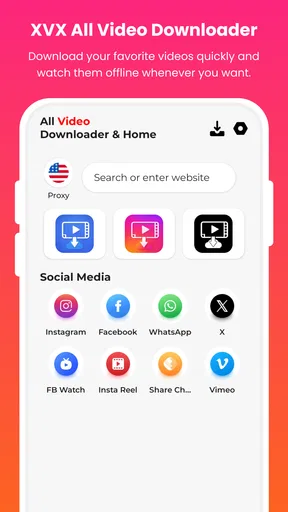
The store summary presents the key idea clearly: MP4 downloading, HD video support, smart detection, and offline playback. In everyday use, that combination points to a simple workflow. You look for a video, let the app recognize the available content, choose a suitable download option, and then return to the saved file when you want to watch it without streaming.
I like this narrow purpose because it avoids the distraction of a large editing workspace. If you only want to keep a video available for a trip, a weak-signal area, or a later viewing session, a focused downloader can feel more direct than opening a general video editor. The trade-off is that the app is not the right match for someone who wants to trim clips, add transitions, record voiceovers, or publish finished videos from the same workspace.
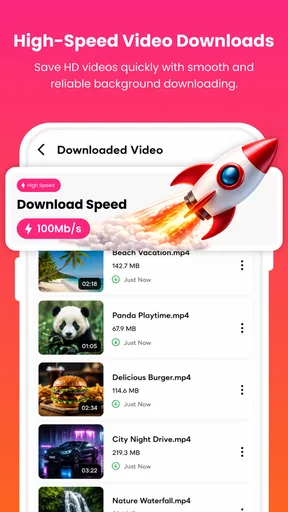
The first thing I would keep in mind is that “HD” should be treated as a quality option, not a guarantee that every source will become high definition. The original video and the available download choices still matter. Selecting the largest option can also consume more storage, so I would not automatically choose the highest quality for every clip.
A calm first setup
After installing the app, I would begin with a small test rather than immediately queuing a long collection. Pick one short video that you genuinely want to watch later. This gives you a quick way to understand where the app places saved content, how its detection step behaves, and whether the resulting file plays properly on your phone.
Keep some free storage available before starting. MP4 files can become large when they are saved at higher quality, and a download that appears convenient can become frustrating if the phone is nearly full. For occasional offline viewing, choosing a moderate quality is often the sensible middle ground: the image remains comfortable on a phone screen while the file is easier to manage.
The app requires Android ten or newer, so compatibility is an important first check for anyone using an older device. If the installation is available on your phone, the next useful step is not changing every setting at once. I would first complete one download, play it from the app or the device’s video area, and only then decide whether a different quality or storage habit suits you better.
The first successful action
The most reassuring first success is not simply seeing a download indicator finish. It is opening the saved MP4 after leaving the original online page and confirming that it plays as expected. That small test answers several practical questions at once: whether the file was stored correctly, whether the selected quality is acceptable, and whether offline playback fits your routine.
A useful everyday scenario is a commuter who wants to prepare a few videos before leaving home. On a reliable connection, the user can detect and save the chosen clips, then test one before heading out. During the journey, the saved files can be watched without repeatedly loading the online source. This is where the app’s value becomes tangible: it turns a future viewing session into something you can prepare in advance.
I would also use a simple naming and storage habit. Save only the videos you are likely to watch, remove finished downloads, and avoid treating the phone as an unlimited archive. The app’s strength is convenient access to selected MP4 files; it is less convincing as a replacement for a carefully organized long-term media library.
How smart detection changes the workflow
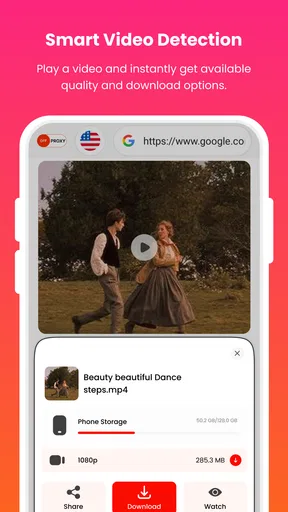
Smart detection is potentially the most useful part of the experience because it can reduce the need to handle a video address manually. Instead of searching through multiple menus, a detected video can lead more directly to the available download action. For a first-time user, this is the part worth testing with ordinary content before building a larger routine around it.
Detection should not be confused with universal access to every video on the internet. Online services can use different delivery methods, restrictions, or formats, and a downloader may not handle every source in the same way. If a video is not recognized, repeatedly tapping the same action is unlikely to solve the problem. I would move on to a clearly supported, openly available video and use that as the baseline for judging the app.
There is also a practical privacy and responsibility angle. Downloading a file for personal offline viewing is different from reposting someone else’s work or bypassing a service’s rules. I would use the app only with content I am permitted to save and keep the downloaded files for an appropriate purpose. That is not a technical limitation of the interface, but it is an important part of using any downloader sensibly.
Common points of confusion
The first common misunderstanding is expecting the app to behave like a universal browser. Its central job is video detection and saving, not general web navigation. If a page contains several moving elements, advertisements, embedded players, or content that does not expose a straightforward downloadable video, the result may be less predictable than it is with a simple MP4 source.
Another point of confusion is the difference between a download completing and a video being easy to find later. I recommend checking the saved location immediately after the first successful transfer. Once you know where the file appears, future downloads become much less stressful, particularly when you need to share, delete, or move a clip using the phone’s normal file tools.
Quality choices can also cause unnecessary frustration. A high-quality file may look excellent but take longer to save and occupy more space. A smaller file may be perfectly adequate for a compact phone display, especially when the video is mainly being watched during travel. My advice is to match quality to the screen and situation rather than selecting the maximum option by habit.
Offline playback has a similar nuance. A saved file is useful because it no longer depends on continuous streaming, but that does not mean every part of the original online experience is preserved. Online comments, live elements, changing recommendations, and other connected features are separate from the video file itself. If your enjoyment depends on those features, a downloader will not replace the original service.
Where it fits beside usual alternatives
Compared with watching videos directly through a streaming app, XVX All Video Downloader is more useful when you expect unreliable connectivity or want to avoid repeatedly buffering the same clip. Streaming is usually better for discovery, current content, and keeping everything inside an established service. Downloading is better when you already know what you want and prefer predictable playback later.
Compared with a general file manager, this app offers a more video-focused route to obtaining MP4 files. A file manager is still valuable afterward for organizing folders, renaming items, and clearing old content, but it does not replace the detection-centered workflow. I see the two tools as complementary rather than competing choices.
Compared with a full video editor, the difference is even clearer. An editor is the better option for cutting footage, adjusting sound, adding text, or preparing a social post. This app is more appropriate when the finished video already exists and your only meaningful task is keeping a playable copy for later. Choosing it for editing would lead to disappointment; choosing it for simple offline access makes much more sense.
Small habits that make it more useful
One useful habit is to test playback before leaving a dependable connection. Do not assume that a completed transfer automatically means the file is ready for an important trip or presentation. Opening the file once lets you catch an unsuitable quality choice or an incomplete-looking result while you still have time to try again.
A second is to use a two-stage storage routine. Keep new downloads together until you have watched or checked them, then move the files you want to retain into a clear personal folder using the phone’s normal storage tools. This prevents the download area from becoming a confusing pile of forgotten clips.
A third is to reserve the highest quality for videos where detail matters. For spoken content, tutorials, or casual viewing on a small display, a moderate option may provide the better balance. For footage with small text, scenery, or fine visual detail, higher quality can be worthwhile if you have enough storage. This simple decision saves space without treating every video identically.
I would also avoid starting several demanding downloads while the phone is busy with other tasks. Even without making assumptions about the device’s internal behavior, fewer simultaneous actions are easier to monitor. A controlled queue helps you notice whether a particular source is recognized and whether the selected file is the one you actually intended to save.
Who should use it, and who should skip it
This app is a good fit for someone who wants a direct MP4 downloader, values offline viewing, and uses an Android device running a compatible version of the operating system. It is especially practical for planned viewing: travel preparation, saving instructional material for a place with weak reception, or keeping a few personally useful clips available without streaming them again.
It is less suitable for an iPhone user, a person with an older Android phone below the stated system requirement, or anyone looking for a complete video-production tool. I would also recommend skipping it if your main concern is managing a large professional media collection. In that situation, a dedicated file-management system, cloud workflow, or established media library may offer better organization than a downloader-centered app.
People who expect every website and every protected video to work should also choose carefully. The app’s usefulness depends on whether the source can be detected and saved in a usable MP4 form. Its strongest scenario is a straightforward video that you are allowed to download, not an attempt to force every online player into an offline file.
My next-step recommendation
After the first successful download, I would not immediately fill the phone with videos. Instead, try one short clip, one larger clip, and one quality choice that reflects how you normally watch. Compare the visual result, file size, and ease of finding the saved item. That small experiment gives you a personal rule for future downloads rather than relying on a setting that may not suit every source.
It is also worth deciding how long you intend to keep each file. If the purpose is a single journey, delete the video afterward. If it is a reference clip you revisit, place it in a clearly named folder and check it occasionally so old files do not quietly consume storage. The app makes saving convenient, but good housekeeping is what keeps that convenience from becoming clutter.
My overall impression is that TAYAL TRADERS has aimed XVX All Video Downloader at a specific, understandable need: taking selected MP4 videos from an online moment into a later offline viewing session. The free price and Everyone rating make it approachable, while the Android ten requirement sets a clear compatibility boundary. The experience is most satisfying when you keep expectations realistic, choose quality thoughtfully, and use it with sources that can be properly detected.
My recommendation is simple: try it if offline MP4 playback is the problem you are actually trying to solve. Start with one permitted video, verify the saved file, and build a modest download routine around your available storage. If you need editing, broad website compatibility, or advanced library management, a different category of app will serve you better. For focused, prepared-ahead viewing on a compatible Android phone, this tool can be a useful addition rather than an unnecessary replacement for everything else.
Verdict
Strengths of XVX All Video Downloader
- Supports downloading videos from multiple social media platforms.
- Simple interface makes finding download options quick and easy.
- Offers several video quality choices for compatible content.
- Built-in preview helps verify the video before saving it.
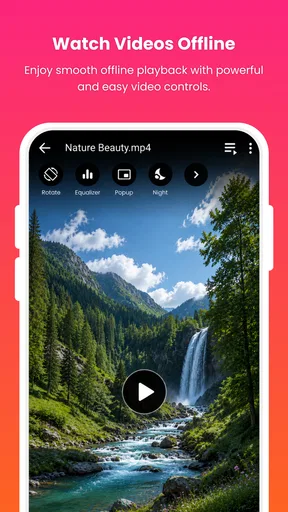
- Downloaded files can be accessed offline without opening the original app.
Limitations of XVX All Video Downloader
- Some websites may be unsupported or stop working after platform updates.
- The app may display frequent advertisements during browsing or downloading.
- Downloading copyrighted videos may violate the creator’s usage rights.
- High-resolution downloads can consume significant storage and mobile data.
- Background downloads may be limited by Android battery or system restrictions.
Similar Picks in This Category
View All
Google TV
Google LLC3.9

iTunes
Apple4.7

YouTube
Google LLC3.8

MX Player
Amazon Mobile LLC4.2

CapCut - Video Editor
Bytedance Pte. Ltd.3.5

PLAYit-All in One Video Player
PLAYIT TECHNOLOGY PTE. LTD.4.5
Frequently Asked Questions
What is XVX All Video Downloader used for?
XVX All Video Downloader is designed to help users save supported online videos to their device for later viewing. After entering a compatible video link or browsing through an integrated source, the app may offer available download formats and resolutions. Its exact capabilities can vary depending on the website, file type, device, and current platform restrictions.
Is XVX All Video Downloader free to use?
The application can generally be downloaded without an upfront purchase, but the overall experience may include advertisements, optional in-app features, or limitations on certain functions. Before downloading, check the current listing for pricing details, subscriptions, and supported devices. Also remember that mobile data usage can be significant when downloading large videos, especially at high resolution.
Can I download videos from every website with XVX All Video Downloader?
No downloader can guarantee compatibility with every website. XVX All Video Downloader may work with particular platforms and direct video links, while protected, private, subscription-based, or unsupported services may not function correctly. Website changes can also affect reliability. Always verify that the source is supported and avoid attempting to bypass technical protections or access content without permission.
Where are downloaded videos stored, and can I watch them offline?
Downloaded files are usually saved in the app’s designated folder or in a location selected through its storage settings. Depending on the operating system, you may be able to open them from the app, a file manager, or the device’s media gallery. Offline playback is possible for successfully saved files, although some formats may require a compatible video player.
Is it legal and safe to download videos with this app?
The app itself may be useful for saving content that you own, have permission to download, or that is offered by the creator for offline use. However, downloading copyrighted material without authorization can violate laws or a platform’s terms of service. Review requested permissions carefully, install the app from a reputable source, and avoid entering sensitive account information into unfamiliar download pages.
